£200
Your website and common questions reviewed, with a written list of what it should answer and pass to you.
One-off
Kiko answers questions, helps customers find what they need and passes enquiries to your team. We set it up using your business information, check it with you and install it on your website.
 Already answering visitors on two client websites: a gym in Bognor Regis and a training academy in Chichester.
Some visitors need a quick answer. Some need help with something already booked. Others are deciding whether to become a customer. We set up Kiko for the conversations your business needs.
Informative: Help people find an answer. Good for businesses that answer the same practical questions all day.
This is the real Kiko widget running in demo mode, for a made-up plumbing firm. Illustrative replies, not quotes from real conversations. Nothing you type is sent.
A mirror of the inbox, built from this demo chat. Nothing is saved.
No visitor message yet
The AI assistant is handling this conversation.
Nothing yet. When a visitor sends a card, their details show here, with marketing consent kept separate.
Start with one type or combine them. The level is set by the work, such as how many websites, workflows or connections it needs.
A chatbot is only useful if it's right and someone follows up. Getting there takes hours of setup, wording and testing. That part is ours. Looking after it each month is optional.
We do
Kiko can show more than text. A visitor can ask for a booking, compare two options or leave their details without leaving the chat, and your team gets it with the conversation.
What your business gets
Visitors ask for a time inside the chat. Your team gets the request with the conversation and confirms it. It's never described as a confirmed booking unless your booking system is connected, which we agree in the scope.
Your logo, colours and wording on the standard widget.
One of four ready styles, in your colours.
Its own layout, avatar and wording, drawn around your brand.
Fully custom designs are quoted after we agree the scope.
This is the real Kiko widget running in demo mode. The businesses are made up and nothing you enter is sent.
The chatbot is half of it. The other half is where the conversations go, and who picks them up.
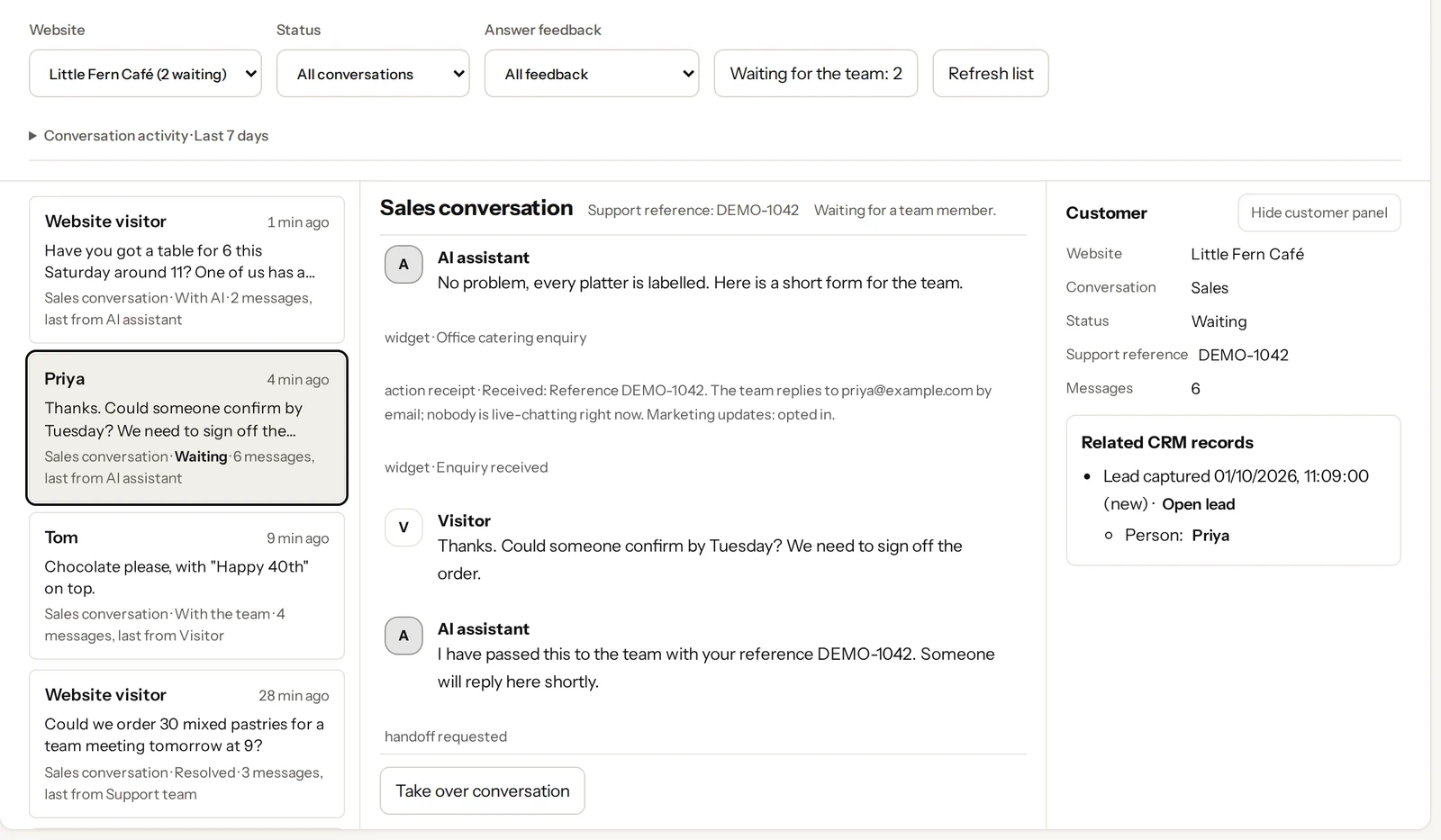
With the chatbot, waiting for the team, with the team, or resolved.
Anyone on your team can take over a conversation, reply and mark it resolved.
The visitor's details arrive with the whole conversation in your Kiko inbox, with marketing consent kept separate.
It answers a price question differently from a complaint.
You approve the answers before anything goes live. If you choose management, we keep it right after that.
We look at your website and the enquiries you get. Then we write down what the chatbot should answer, what it passes to you and where enquiries go.
You read the written Blueprint
We set up its sources, tone, handoff and enquiry form in your colours. You try it in a private test chat and approve the answers.
You approve the answers
We add one line of code to your website. It only counts as working once a real visitor has used it on your site.
Live on your website
Each month we check how it's working, review a sample of conversations, update the agreed information and send you a short report.
Optional, month to month
The type of chatbot depends on the conversations you want it to handle. The level depends on the work needed to set it up and look after it. No VAT charged (M1 Studio isn't VAT registered).
Every done-for-you set-up includes your approved business information, your branding, an enquiry route with consent, a handoff to your team and checks before launch. More involved workflows and connections to other systems are agreed separately.
Know what your chatbot should say before anything is built.
Your chatbot set up, approved by you and live on your website.
Optional. It keeps getting better, without you having to look after it.
Foundation
One website and the questions you get most.
£200
Your website and common questions reviewed, with a written list of what it should answer and pass to you.
One-off
£1,800
One website: your approved information, branding, an enquiry route with consent and a handoff to your team, checked before launch.
Fixed. £900 to start, £900 at launch
£250 a month
A health and handoff check, a sample of conversations reviewed, agreed changes rechecked and a short report.
Month to month, 30 days' notice
Growth
Enquiries captured and followed up.
£500
Adds your enquiry route tested from start to finish, where enquiries should go, and the consent wording.
One-off
From £3,000
Adds a more involved enquiry or customer care workflow, and one connection to another system if we agree it.
Fixed once the scope is agreed
£500 a month
Adds a review of your workflow and its open questions, and an agreed batch of improvements.
Month to month, 30 days' notice
Scale
Several sites, services or locations.
£1,000
Adds each site or location, booking and quote questions, and the order to set them up in.
One-off
From £5,000
Several websites or locations, or more complex routing, with documented escalation.
Fixed once the scope is agreed
£750 a month
Covers every site, with a written review of the wider service and agreed priorities.
Month to month, 30 days' notice
AI and other running costs are listed separately before you agree, and billed at cost, within daily, monthly and lifetime spending limits you set.
The full Blueprint fee comes off an eligible set-up if you go ahead within 14 days of receiving the complete written Blueprint. It never comes off monthly management. You don't have to buy a Blueprint before set-up if the work is already clear.
You don't need a Blueprint before set-up, or our set-up before management. Not sure which level? Ask us.
Every chatbot we set up uses AI providers with zero data retention and no training on your chats, spending limits you set, and marketing consent that's never ticked for anyone.
The same software is available to run yourself, without our setup or monthly checks. You load your own information and look after it. It's in an invited beta, and we open each account for you for now.
On both, AI replies stop for the month if the AI allowance runs out, rather than adding charges.
£29 a month, no VAT charged
One business running its own chatbot
£79 a month, no VAT charged
A small team sharing the inbox
Yes. We can combine information, customer care and sales conversations in one chatbot. We agree the questions, handoffs and any connections to other systems before we quote.
We set up the wording and tone with you, then you try it in a test chat and tell us what doesn't sound like your business. Visitors are still told they're talking to an AI assistant.
It uses information you've approved and we test the answers before launch, but mistakes are still possible. It's set up to offer a handoff when it doesn't have what it needs, and we agree how problems are reported and corrected before it goes live.
Set-up is £1,800 fixed at Foundation, or from £3,000 and £5,000, fixed once the scope is agreed. Management is optional, at £250, £500 or £750 a month. A written Blueprint first is £200, £500 or £1,000. AI and other running costs are listed separately at cost. No VAT is charged, because M1 Studio isn't VAT registered.
Yes. They can ask for your team. Kiko tells them when they're waiting for someone, and your team picks up the conversation in the inbox. It doesn't mean a person is available at every hour.
It can explain your booking or quote process and collect an enquiry. Anything that makes a booking, checks availability or produces a quote has to be agreed, checked and included in your scope. We never describe an enquiry as a confirmed booking.
No. Management is optional, month to month, with 30 days' notice. If you look after Kiko yourself, you keep its information current. We explain the software, hosting and running costs before you agree.
Kiko asks permission when it collects an enquiry, with marketing consent as a separate choice that's checked on the server and never ticked for anyone. We use models from OpenAI, Anthropic or Google through Vercel AI Gateway, set up for zero data retention and no training on your conversations. Your account can be exported in full, or deleted, on request.
No. You set daily, monthly and lifetime spending limits, and nothing is switched on until someone with permission saves them. Running costs are billed at cost and listed before you agree.
We check your website and how it would be installed before we agree the work. It installs from one pinned, integrity-checked line of code and only runs on the web addresses you approve. It works with a keyboard and screen readers, and on a done-for-you set-up you don't install anything yourself.
No. Tell us about your business in writing and we'll send the questions we need answered. Blueprints are delivered in writing, with a walkthrough if you'd like one.
What do people ask most often? What would you like Kiko to help with? Tell us a little about your business and we'll explain the next step.
Tell us about your business and what you'd like the chatbot to do. If you'd like a written Blueprint first, pick it below; it's never required.
Preview: nothing is sent from this page yet.